
After a few days at the Canton Fair or visiting factories in China, your WeChat can fill up with suppliers. One sends a quotation, another sends sample photos, and a third replies with a voice message. By the time you sit down to compare them, you’re scrolling through chat after chat, trying to match names to products.
It gets frustrating when you need something specific: the lower MOQ someone offered, the address for tomorrow’s factory visit, or the message confirming that packaging was included in the price.
In this guide, I’ll show you how to keep supplier contacts, quotations and important messages easy to find. We’ll start with payment setup—something to sort out before your trip—then cover adding suppliers, naming contacts, translating replies, saving information and searching old conversations.
Menu wording can vary between iPhone and Android, app versions and account regions. The paths below describe common English-language menus; use the equivalent option shown in your app.
Quick reference: the WeChat features buyers need most
| What you want to do | Where to start | How it helps with suppliers |
|---|---|---|
| Add a payment card | Me → Services → Wallet → Cards → Add a Card | Set up an eligible card for merchant payments |
| Pay a merchant | Chats → + → Scan, or Me → Services → Money/Pay and Receive | Scan their payment code or show yours |
| Add a supplier | Chats → + → Scan or Add Contacts | Connect by QR code or WeChat ID |
| Rename a contact for your own reference | Contact profile → Remarks and Tags, or the profile’s … menu | Remember the company, product and person |
| Group contacts by category | Contact profile → Tags; browse via Contacts → Tags | Find relevant suppliers together |
| Translate a Chinese text message | Press and hold the message → Translate | Understand ordinary written replies |
| Save an important message | Press and hold → Add to Favorites | Keep quotations, addresses and decisions accessible |
| Find saved information | Me → Favorites | Retrieve the items you saved |
| Search one conversation | Open chat → … → Search Chat History | Find a price, date, file or product reference |
1. Set up WeChat before your China business trip
Install the official WeChat app, register with your own phone number and complete the security steps the app requests. Keep access to that number during your trip, including any SMS verification you may need.
If you prefer English menus, look under Me → Settings → General → Language or Multilanguage. Changing the interface language does not automatically translate every message.
Use a recognizable profile name and photo. A supplier who meets many buyers should be able to connect your friend request with the person they met.
For example, Alex | Northline Home is easier to recognize than an unrelated nickname. You can put your company and buying interests in your introduction without sharing confidential information.
2. How to add a foreign bank card to WeChat Pay
Payment setup is separate from adding contacts and chatting. Foreign visitors can link supported international cards for eligible merchant payments, subject to the card issuer and Weixin Pay’s requirements. Tencent’s international-card guidance
The usual route is:
- Open Me → Services → Wallet.
- Tap Cards or Bank Cards → Add a Card.
- Enter the card details through the app’s official form.
- Complete the identity and card verification requested.
- Set or confirm your payment password if prompted.
- Check that the card can be selected for an eligible merchant payment.
Some accounts show Pay and Services or a different wallet entry. If you cannot find mainland payment setup, use the app’s official Help Center rather than assuming every regional wallet has the same capabilities.
Tencent’s card guide shows the wallet route and explains that international-card use is for supported purchases; functions such as personal transfers, red packets and wallet top-ups are not supported through that route. Weixin Pay international-card guide, hosted by Duke Kunshan University
3. How to pay with WeChat in China
Scan a merchant’s payment QR code
Open Chats → + → Scan, scan the code, check the merchant name and enter the amount if requested. Review the selected card and any fee, then authorize payment. Check the result before leaving.
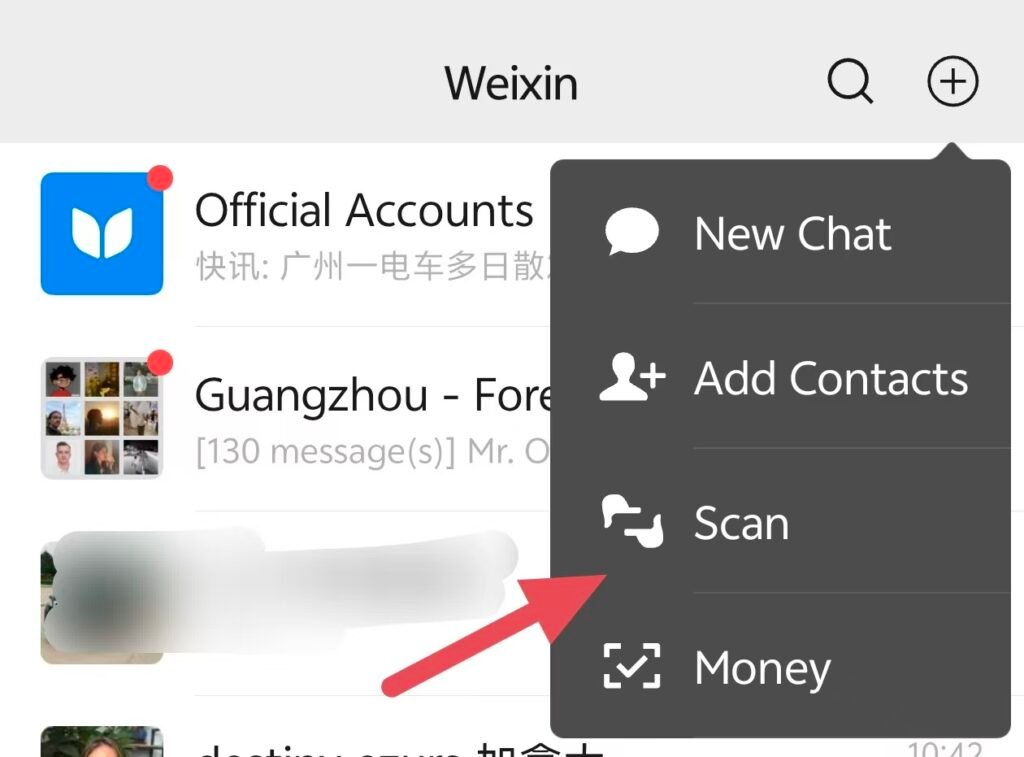
Let the merchant scan your payment code
Open Me → Services → Money, Pay and Receive, or the equivalent payment-code option. Select the intended payment method and let the cashier scan the code.
Your payment code is different from your personal contact QR code. Show it only when you intend to pay; do not send screenshots of it to suppliers as an introduction.
How to test your Wechat Pay before going to China?
You can try a real merchant payment before your trip using my verified mainland China merchant collection code.

If your payment fails, see my guide: Can I test Alipay or WeChat Pay before going to China?
What about fees?
Tencent’s published standard guidance waives its international-card transaction fee for eligible payments of RMB 200 or less; larger payments can carry a 3% fee. In May 2026, Tencent also announced a 90-day processing-fee waiver for eligible first-time international-card users, covering up to RMB 1,000 in daily spending. Check the offer and fee shown in your app before paying; your bank’s currency-conversion or overseas charges may be separate. Standard fee guidance, Tencent’s 2026 waiver announcement
4. How to add friends and Chinese suppliers on WeChat
New account? Ask suppliers to add you
If you have just registered for WeChat, avoid sending lots of friend requests in quick succession. That pattern may look like spam or suspicious activity and trigger account restrictions, even when you are simply meeting suppliers.
When possible, show suppliers your personal QR code and ask them to add you, then check Contacts → New Friends to accept their requests.
This reduces the number of requests you send yourself; it does not guarantee that a new account will avoid security checks. If WeChat shows a warning or asks you to wait, follow the app’s instructions rather than repeatedly trying.
Scan the supplier’s personal QR code (Same as scanning a payment QR code)
- Open Chats and tap + → Scan.
- Scan the QR code on their phone or business card.
- Check the profile and tap Add or Add to Contacts.
- Include a short introduction in your friend request.
- Once connected, send a message identifying your project.
To let a supplier add you, open Me, tap your profile and find My QR Code.
Search by WeChat ID or phone number
Open Chats → + → Add Contacts and enter the supplier’s exact WeChat ID. A phone number may also work if their account can be discovered that way.
A display name is not necessarily a searchable WeChat ID. If you cannot find them, ask for their personal QR code.
5. How to set WeChat remark names for suppliers
A remark name is your own label for a contact. It helps you recognize them even if they change their profile name or photo; it does not rename their account for everyone else.
- Open the supplier’s contact profile from Contacts, or tap their avatar in a chat.
- Look for Remarks and Tags, Set Remark, or the equivalent inside the profile’s … menu.
- Enter a name that identifies their product, company and contact person.
- Save the change.
Use a consistent format:
Product | Company | Contact | Location or source
Examples:
- Bags | ABC Leather | Lily | Guangzhou
- Lighting | BrightCo | Kevin | Zhongshan
- Packaging | PackCo | Amy | Canton Fair
These names are illustrative. Use the actual supplier details you have confirmed.
If you prefer short names, assign a supplier code:
BAG-03 | ABC Leather | Lily
Use the same code in your sample labels, quotation files and comparison sheet. This connects the WeChat conversation to the rest of your buying records.
Where the contact profile offers a description or additional notes field, record the product discussed, where you met and the next action. Keep long specifications in a document rather than squeezing them into the contact name.
6. Organize multiple suppliers with WeChat tags
Remark names tell you who someone is. Tags help you group relevant contacts.
Open the supplier’s profile and find Remarks and Tags → Tags, or the equivalent menu. Create or select a tag, then save it. To browse tagged contacts, look under Contacts → Tags.
Start with a small set:
| Tag type | Examples |
|---|---|
| Product | Bags, Lighting, Packaging |
| Follow-up stage | Quote Needed, Sample Requested, Shortlisted |
| Where you met | Canton Fair Oct 2026, Guangzhou Market |
You can apply more than one tag where supported. Remove or update stage tags as the conversation progresses.
Avoid building dozens of labels that you will not maintain. Three useful tags are better than twenty forgotten ones. Also remember that tagging a contact as a factory does not verify that they own a factory.
7. How to use WeChat’s built-in translation
Translate a received text message
- Open the conversation.
- Press and hold the Chinese text message.
- Tap Translate.
- Read the translation displayed with the original message.
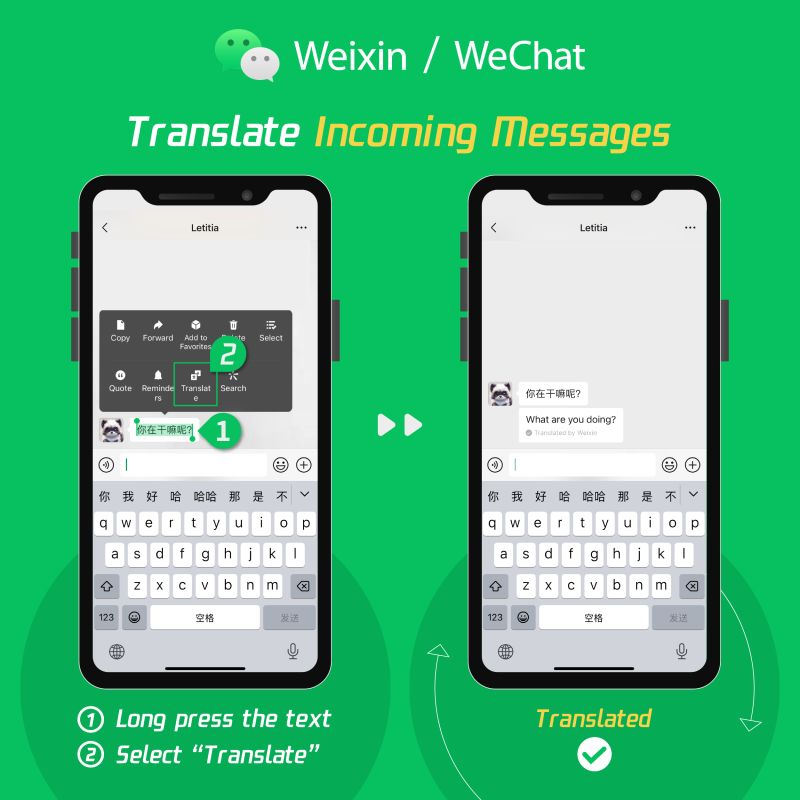
For translation preferences, look under Me → Settings → General → Translation, if available. Some versions offer automatic translation of incoming messages. If that setting is missing, use manual long-press translation. Shanghai’s official visitor guide also documents translation settings and the manual method. Shanghai WeChat guide
For everyday messages such as an appointment time, translation can be helpful. For specifications, payment terms and commitments, ask the supplier to confirm the meaning in clear written terms.
For example, “delivery in 15 days” leaves important questions unanswered: 15 days after the deposit, sample approval or material arrival? Calendar days or working days? Shipment from the factory or arrival at your destination?
What else is in the same long-press menu?
Pressing and holding a message opens several useful actions. The exact options depend on the message type and app version.
| Option | Useful business application |
|---|---|
| Copy | Paste a model number or address into your records |
| Quote/Reply | Ask about one specific price or statement |
| Forward | Share an agreed item with your colleague or interpreter |
| Add to Favorites | Keep a quotation or important confirmation |
| Select/Multiple Select | Select a series of related messages for an available sharing or saving action |
| Translate | Read a text message in another language |
Quote/Reply is especially useful when several topics overlap. Quote the exact price message and ask, “Does this include our logo and individual packaging?” This reduces the chance of getting an answer about a different item.
8. How to save messages to WeChat Favorites—and find them again
To save a message, photo or supported file, press and hold it → Add to Favorites. For several related messages, try Select/Multiple Select, choose the items and use the Favorites action if your app offers it.
To find saved items later, open Me → Favorites. Use the search or content filters available there. A saved item does not stay pinned at the top of the original chat.
Useful information to save includes:
- The latest quotation, with its date and product reference
- MOQ and sample terms
- A confirmed factory address and appointment
- Product photos linked to a model or sample code
- Written confirmation of materials, dimensions and packaging
- The agreed next step and deadline
Keep enough context to understand the item later. A saved message saying “USD 4.80” is not useful if you cannot tell whether it means a sample, a bulk unit price or an accessory.
If Favorites lets you edit a saved item or add tags, use the same supplier code you put in the remark name. Otherwise, keep a separate Favorites note summarizing the supplier and linking the details through that code.
Download important quotation files and specifications to your own organized folder as well. Favorites is a convenient reference, but should not be your only copy of business records.
9. How to search WeChat chat history
Search inside one supplier’s conversation
- Open the supplier’s chat.
- Tap … in the top-right corner.
- Choose Search Chat History or the equivalent option.
- Enter a distinctive keyword, model number or phrase.
- Open a result and read the surrounding messages.
Useful searches include MOQ, sample, deposit, packaging, lead time, a product code or an exact price.
If the supplier wrote in Chinese, try the wording from their original message. Do not assume searching the English translation will find the Chinese original.
Search by Date, Files, Links, or Photos and Videos when those filters are available. In group chats, look for a member filter to narrow down who sent the information. A model number typed in a message is easier to retrieve than one visible only inside an image.
Search across several supplier chats
Use the search field at the top of Chats. Enter a product code, company name or phrase, then inspect Chat History results rather than just the contact results. Open further results if the app offers them.
This is helpful when you remember that someone quoted a particular product but cannot remember which supplier it was.
Search retrieves accessible history; it does not recover deleted messages or files that are no longer available. Save important documents while you can still open them.
10. Keep active conversations manageable
Open a chat’s … settings and look for Sticky on Top or Pin Chat. Pin only the suppliers who currently need action. If you pin everyone, the top of the chat list stops being useful.
For busy, non-urgent groups, use Mute Notifications where appropriate. Muting notifications does not mean the conversation no longer needs checking. Review those groups at a planned time.
If you create project groups, give each one a clear name such as BAG-03 | Sample Development | Northline. Keep competing suppliers in separate conversations so prices and specifications are not shared accidentally.
11. A five-minute supplier-management routine
After a meeting, take five minutes to organize the conversation while you still remember the details:
- Set the remark name: product, company, person and supplier code.
- Apply useful tags: product category and current follow-up stage.
- Send a written recap: specifications discussed, open questions and next step.
- Save key information: quotation, address, reference photos and confirmed terms.
- Update your comparison sheet: next action and deadline.
Here is a message you can adapt:
Thank you for meeting today. To confirm, we are discussing model B12 with our logo and individual packaging. Please send your quotation, MOQ, sample cost and production lead time. Please also confirm the material and when the lead time starts. Our next step is to review the sample before deciding on a production order.
Send questions in numbered points. When the supplier replies, quote unanswered questions individually instead of sending the whole list again.
Before changing phones, look for Chat History Migration & Backup under WeChat’s chat settings and follow the available official process. Keep independent copies of invoices, specifications and final approvals. Treat Clear Chat History and deleting a conversation carefully: neither is an organization shortcut.
Frequently asked questions
Can I use WeChat to contact Chinese suppliers before visiting China?
Yes. Once your account is working and the supplier accepts your request, you can communicate before arrival. Ask for their WeChat ID or personal QR code and introduce your company and project.
Should I let suppliers add me if my WeChat account is new?
That is a sensible approach when you meet suppliers. Show them your personal contact QR code and accept their requests under Contacts → New Friends. Avoid sending many requests in a short period, and follow any security prompts. There is no guaranteed safe number of new contacts for every account.
What is the easiest way to manage many suppliers on WeChat?
Use consistent remark names, a few useful tags, Favorites for important information and a separate supplier comparison sheet. Keep the same supplier code across all four.
Can a supplier see the remark name I give them?
A contact remark is your private reference label. It changes how you identify that contact in your account, rather than their public profile name. Check what is visible before sharing screenshots or contact cards.
Where are my saved WeChat messages?
Open Me → Favorites. Look for the saved item there and use available search or filters. Favorites is separate from the original chat history.
How do I find an old supplier quotation?
Open their chat, tap … → Search Chat History, then search by a product code, keyword or price. Try the Files or Date filter if available. If you cannot remember the supplier, search from the Chats screen and inspect chat-history results.
Can WeChat translate Chinese supplier messages into English?
Yes, supported text messages can be translated by pressing and holding the message and selecting Translate. Some versions also provide automatic translation. Confirm technical and commercial details explicitly rather than relying on translation alone.
Need help with your business trip in Guangzhou?
I’m Tina, a business interpreter and tour guide based in Guangzhou. I can help with English-Chinese supplier communication, factory visits and other tasks.
Explore my interpreting and local-support services or contact me about your China business trip.